When Chromebooks first came out, WiFi and internet availability weren’t as widespread as they are today, so having a laptop that entirely relied on an internet connection just wasn’t a good option if you were going to use it for travel (even worse if doing work on the road or on a train). Even today, open WiFi is not as much of a commonality, even in major cities.
So what are your options to stay connected when you’re traveling with an internet-dependent Chromebook?
One is using your phone as a mobile hotspot, which requires a phone plan that allows it. For example, T-Mobile (this post is not sponsored) allows unlimited hotspot usage at unusable 3G speeds, but you have to pay more to get 5G speeds that are throttled back down to 3G after a certain amount of data usage.
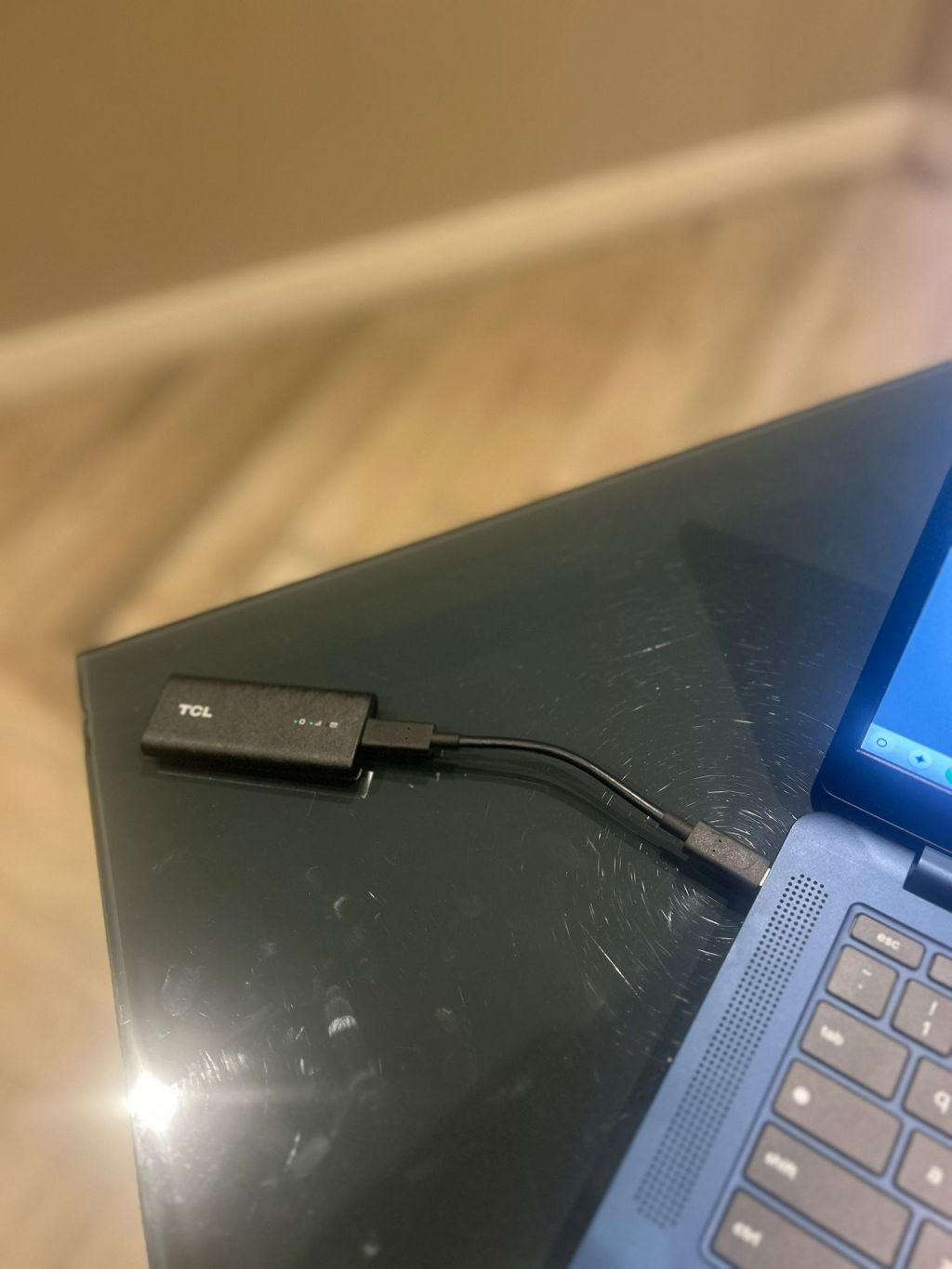
The second option is getting dedicated hotspot (USB cell modem). These are usually cellphone modems that give your devices internet access without needing to depend on your phone as a hotspot (nor draining its battery).
The third option is buying a cellular-enabled Chromebook. Some carriers like Verizon and T-Mobile (this post is not sponsored) sell Chromebooks that are enabled on their network with an additional data plan.
Mobile Hotspot
This is the most accessible option of the three, since it only requires hardware you already have (your phone) and a data plan update on your carrier. It has also been around for a long time. Some carriers provide unlimited hotspot usage, but at unusable 3G speeds, so depending on your needs, it might be worth going for 5G hotspot data. However, this too will probably be throttled back down to 3G after a certain amount of data is used. Another downside is that it will be a big phone battery drain.
USB–Dongle Cell Modem
I recently bought a Thinkpad X280 with a SIM card slot I intended to add onto my T-Mobile plan, but unfortunately it wouldn’t work on Linux. Instead, I ended up getting a dongle USB modem that I could use with more than one machine. The TCL Linkport (pictured) connects to any machine via USB-C. It quickly synchs up to the network and allows you to online right away. It’s been a life-saver when I’ve had to do last minute work on a cab or a train ride. The only downside is that the dongle awkwardly hangs off the side (not ideal for using on your lap) and that its simple indicator lights don’t give you more detailed information about its status other than red or green indicators.
Cellular-Enabled Chromebooks
The availability of phone hotspots and manufacturing costs has decreased the motivation of manufacturers to make cellular-enabled laptops, but for some professions that do field work, the need for them is still worth the investment. Many of them also tend to have more energy-efficient chips (like Mediatek’s ARM chip on the Lenovo 100E or the Qualcomm chips on Microsoft’s Surface Pro X), despite being a niche market that includes Chromebooks. The options here are also limited:
Lenovo 100e Gen 4: This 11-inch screen Chromebook offersalways-on 4G LTE connectivity (though it’s definitely not worth the $359 T-Mobile is selling it for). You might be able to get an unlocked version directly through Lenovo or another site. The Mediatek 528 processor and 4GB RAM are adequate for basic office work in a pinch but is far away from Chromebook Plus territory. Some Lenovo 500E models also have 4G LTE connectivity.
Orbic Chromebook: Sold through Verizon, the Orbic (never heard of this brand) has similar specs to the Lenovo 100e: an 11-inch screen with 4 GB of RAM and a 32 GB eMMC storage, except for its Qualcomm Snapdragon 7 c quad-core processor. It’s also ridiculously priced at over $300.
Acer Chromebook Spin 513: This is the best out of the cellular Chromebooks line-up, mostly because of its larger screen and build, which makes it a better business device. It’s equipped with a Qualcomm Snapdragon 7c processor and 64 GB of eMMC, but only carries capacity for 4G LTE connectivity. This would make a better business on-the-go device because of its larger 13-inch screen. It also comes with a touchscreen option.
Conclusion: Out of all three options, I prefer the USB dongle modem since saving phone battery is a priority during travel. For day-to-day mobility in the city, your regular phone’s hotspot will be your best bet. Cellular-enabled Chromebooks would have seemed like a great universal optional feature for Chromebooks to have from their onset, but unfortunately they’re hard to find and don’t always have the ideal configuration.


 Chromebook Reviews